As part of our ongoing efforts to improve service and accessibility, we’ve launched a new land records system to better manage property information for residents and property owners.
If you’ve recently moved or need to correct your mailing address, it’s important to update your information to ensure you continue receiving important notices and correspondence.
To help guide you through the process, we’ve provided a short video tutorial followed by step-by-step written instructions. Choose the format that works best for you and follow the directions below to update your mailing address quickly and easily. When you’re ready, visit the Property Tax Information Portal to update your address.
Watch: How to Update Your Mailing Address
This short video walks you through the steps to update your mailing address in our new land records system. It’s a quick and easy way to see the process before following the written instructions below.
Step-by-Step Instructions
Prefer written directions? Follow these detailed steps to update your mailing address in our new land records system. Each step is designed to guide you through the process with clarity and ease.
From the Ascent homepage
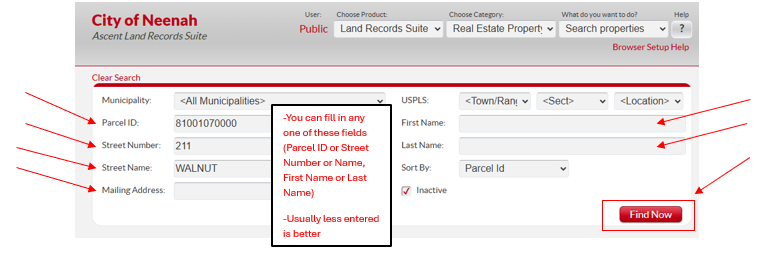
Search for the property whose mailing address you want to change.
You can search for a property using any of the available fields.
When searching using a parcel ID, omit the dashes (-) between numbers. Also include the leading 8.
When looking up anything other an individual name (Trust, LLC, etc), enter the name in the “Last Name” field.
Then click “Find Now”.
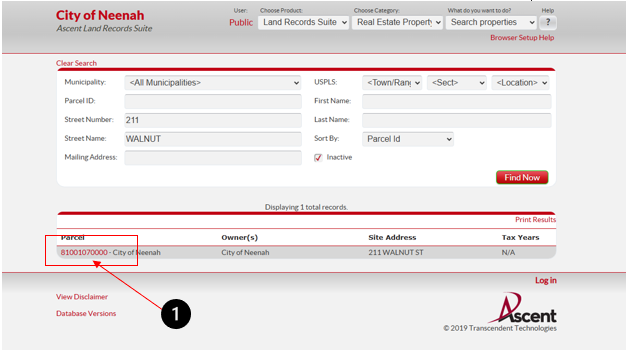
When you locate the property you are looking for, click on the parcel ID.
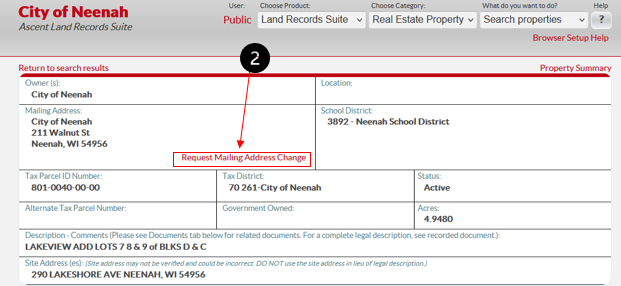
Click on the “Request Mailing Address Change” button.
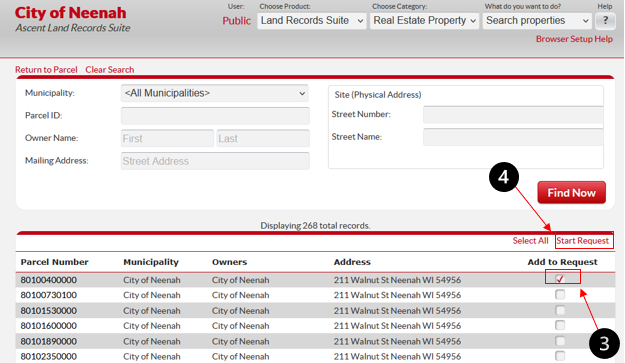
If there is more than one parcel with the same address, all will populate, and you can select which parcels to update.
Once you select all the parcels you want changed, click “Start Request”.
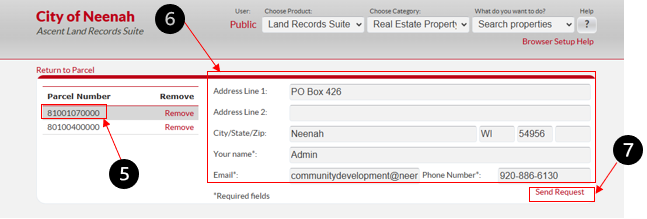
Verify the parcel number(s) you are changing the mailing address for. If there is a parcel number listed you do not wish to change, click “Remove” to take it off the list.
Fill out the new mailing address AND your name, email and phone number. This helps us verify who is making the request.
Click “Send Request” when complete.
This request will be submitted to our Assessor’s office and will be updated within seven (7) business days.
Ready to submit an address change or alternate mailing address?